Visual Team
Visuals
Diagrams, screenshots, storyboard plans, and video asset requirements.
Paid Beta Screenshot Approval
Launch siteChecking command-center API...
Set final approval to Yes only after the shipping UI, billing activation, support path, and consent flows are frozen and freshly captured.
Visual Asset Inventory
Open inventory CSVStale versioned screenshots are blockers: evidence must match the current app version before paid-beta approval.
| Asset | Type | Status | Freshness | Evidence Version | Current Version | Path | Next Step |
|---|---|---|---|---|---|---|---|
| Desktop Alpha83 answer-first response | Screenshot | Refresh required | Current | 0.1.0-alpha.83 | 0.1.0-alpha.83 | docs/launch_command_center/visuals/alpha83_desktop_answer_first.png | Refresh after each desktop release that changes response presentation or workspace layout. |
| Idle NyrA buddy | Screenshot | Refresh required | Currentness not versioned | n/a | n/a | docs/nyra-compact-character-smoke.png | Refresh after final buddy UI freeze. |
| Right-click command menu | Screenshot | Refresh required | Currentness not versioned | n/a | n/a | docs/nyra-action-router-smoke.png | Refresh after final action menu text is approved. |
| Live voice controls | Screenshot | Refresh required | Currentness not versioned | n/a | n/a | docs/computer-use-realtime.png | Refresh after final live voice UI pass. |
| Wake-gated pause/listening behavior | Screenshot | Refresh required | Currentness not versioned | n/a | n/a | docs/nyra-buddy-speaker.png | Refresh after final wake word, pause, and context logging UX review. |
| Single buddy with right-click chat panel | Screenshot | Refresh required | Currentness not versioned | 0.1.0-alpha.66 | n/a | docs/launch_command_center/visuals/alpha66_single_buddy_panel_smoke_settled.png | Refresh after each buddy panel, transparency, or narrow-screen layout change. |
| Screen-look permission state | Screenshot | Refresh required | Currentness not versioned | n/a | n/a | docs/computer-use-screen-look.png | Refresh after final consent copy review. |
| Camera permission state | Screenshot | Refresh required | Currentness not versioned | n/a | n/a | docs/computer-use-camera.png | Refresh after final consent copy review. |
| Computer-control active state | Screenshot | Refresh required | Currentness not versioned | n/a | n/a | docs/computer-use-control.png | Refresh after final high-impact gate UI review. |
| Stop button / interruption evidence | Screenshot | Refresh required | Currentness not versioned | n/a | n/a | docs/computer-use-interrupt.png | Refresh after final interruption UX review. |
| Android floating buddy over launcher | Screenshot | Refresh required | Stale | 0.1.0-alpha.80 | 0.1.0-alpha.83 | docs/launch_command_center/visuals/alpha80_emulator_after_show_bot.png | Refresh after each Android alpha that changes bridge, Phone Control, overlay, or setup UI. |
| Android foreground panel and answer-first swarm state | Screenshot | Refresh required | Stale | 0.1.0-alpha.80 | 0.1.0-alpha.83 | docs/launch_command_center/visuals/alpha80_emulator_panel.png | Refresh after each Android alpha that changes Close, Hide Bot, overlay, launcher, or panel behavior. |
| Android alpha83 responsive Command surface | Screenshot | Blocked | Missing | 0.1.0-alpha.83 | 0.1.0-alpha.83 | Not captured | Refresh after each mobile Command surface or autonomous-run layout change. |
| Android alpha83 Hide Bot recovery surface | Screenshot | Refresh required | Stale | 0.1.0-alpha.80 | 0.1.0-alpha.83 | docs/launch_command_center/visuals/alpha80_emulator_hidden_recovery.png | Refresh after each Android alpha that changes Hide Bot or overlay hidden-state behavior. |
| Billing activation screen | Screenshot | Partial | Currentness not versioned | n/a | n/a | docs/launch_command_center/visuals/08_license_activation_flow.jpg | Diagram exists; capture actual app screen after hosted billing backend is ready. |
| Customer Portal screen | Screenshot | Blocked | Currentness not versioned | n/a | n/a | Not captured | Blocked until Stripe Customer Portal is configured. |
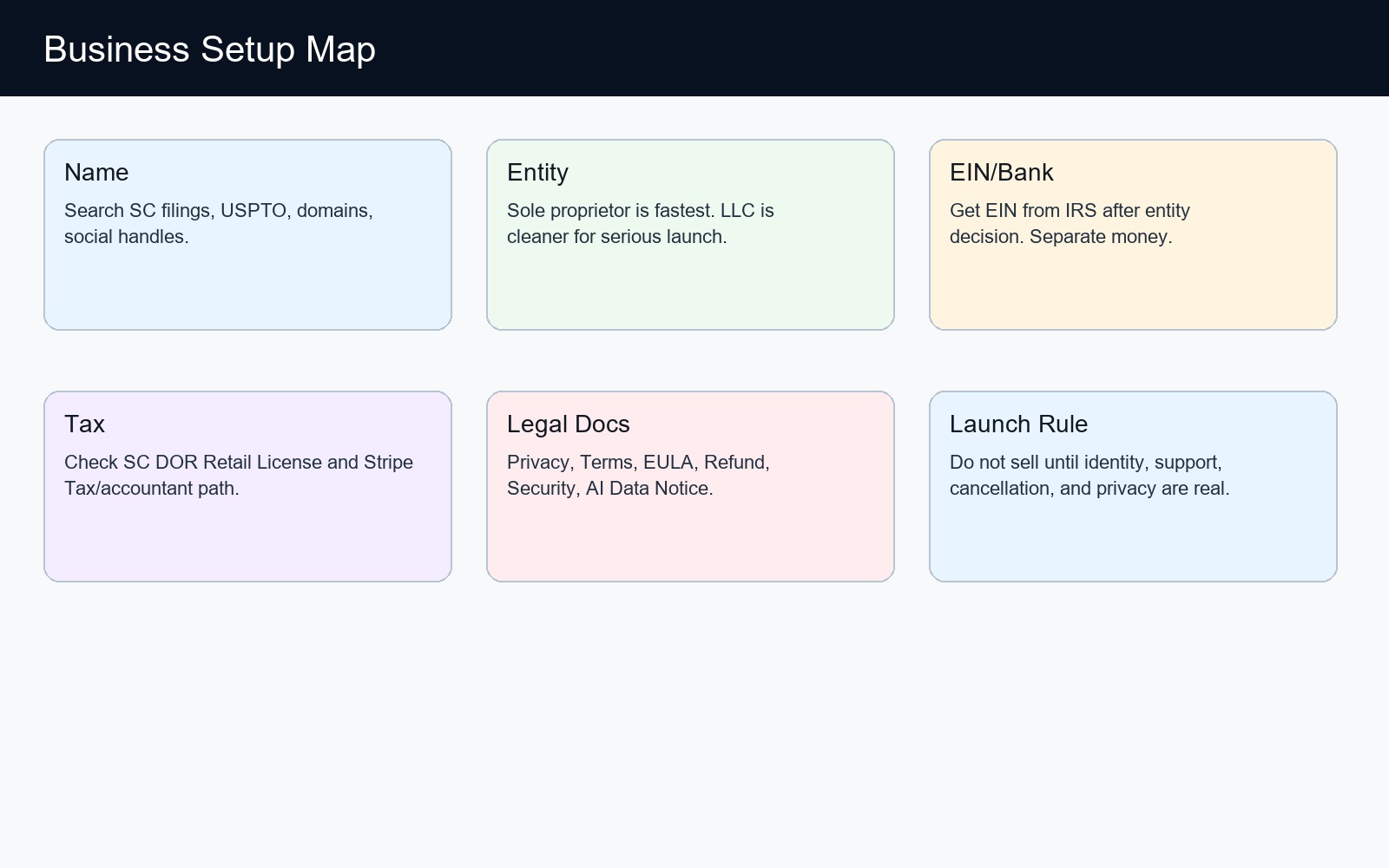
| Business setup map | Diagram | Ready | Currentness not versioned | n/a | n/a | docs/launch_command_center/visuals/01_business_setup_map.jpg | Ready for command center. |
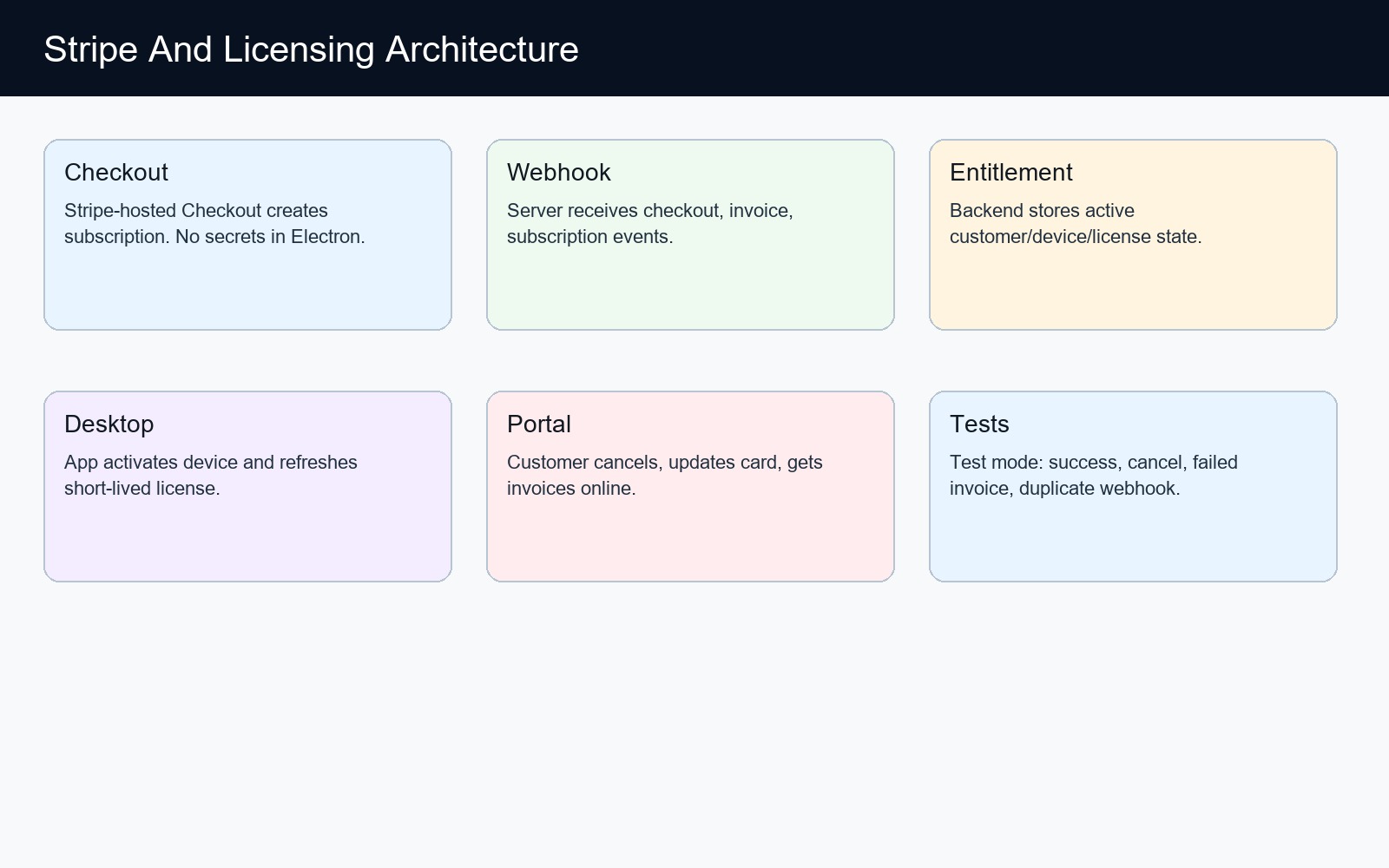
| Stripe architecture | Diagram | Ready | Currentness not versioned | n/a | n/a | docs/launch_command_center/visuals/02_stripe_architecture.jpg | Ready for command center. |
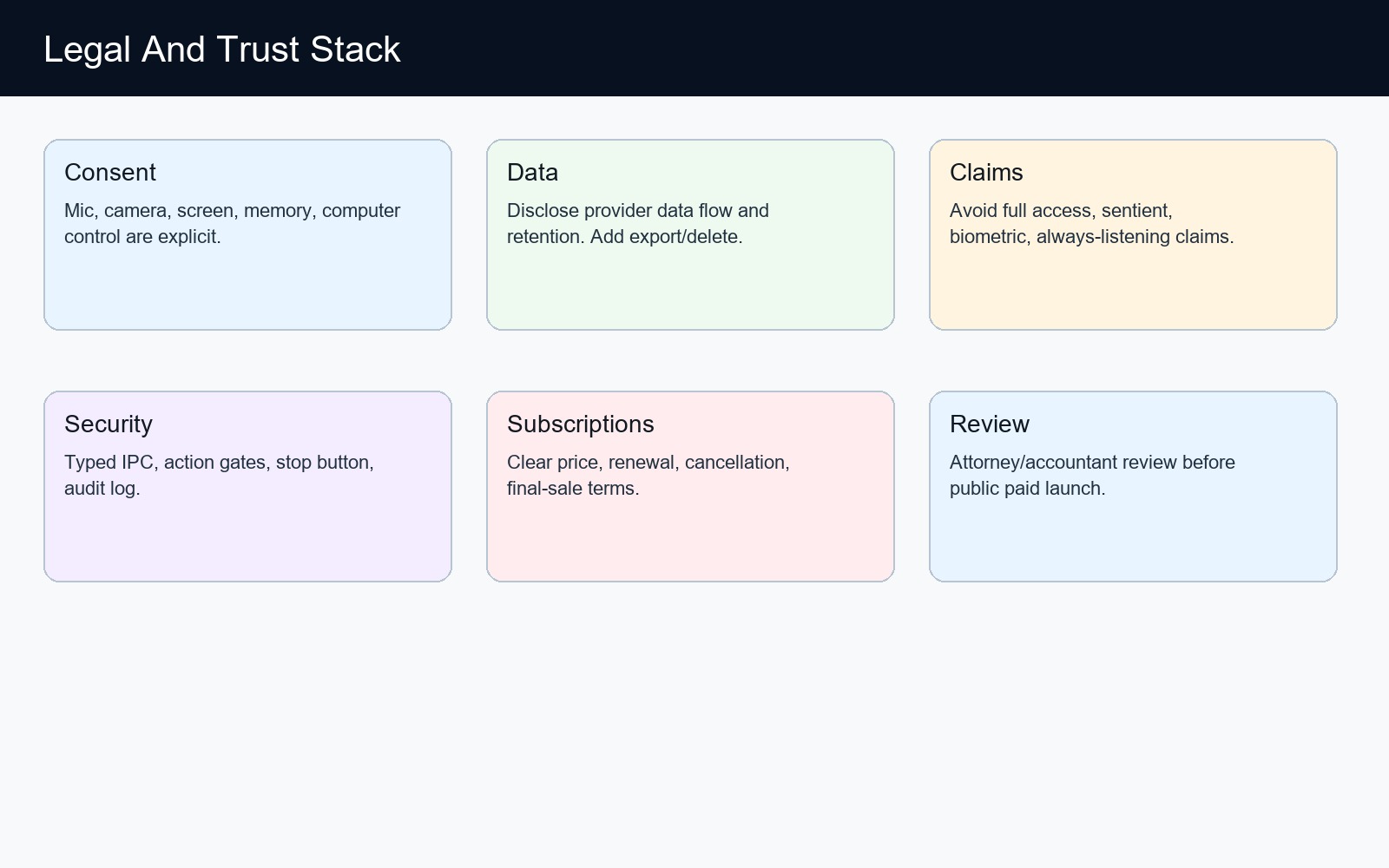
| Legal trust stack | Diagram | Ready | Currentness not versioned | n/a | n/a | docs/launch_command_center/visuals/03_legal_trust_stack.jpg | Ready for command center. |
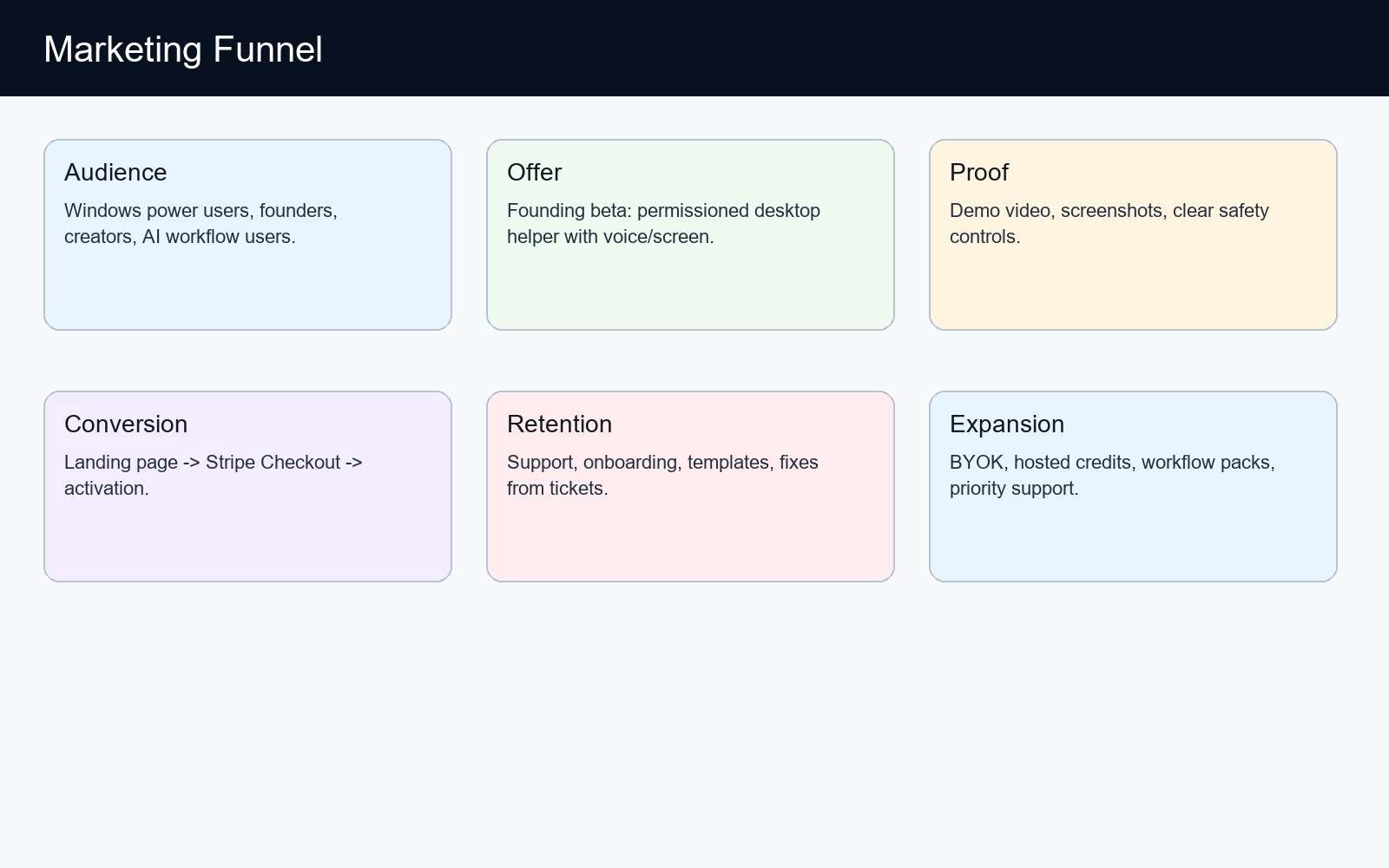
| Marketing funnel | Diagram | Ready | Currentness not versioned | n/a | n/a | docs/launch_command_center/visuals/04_marketing_funnel.jpg | Ready for command center. |
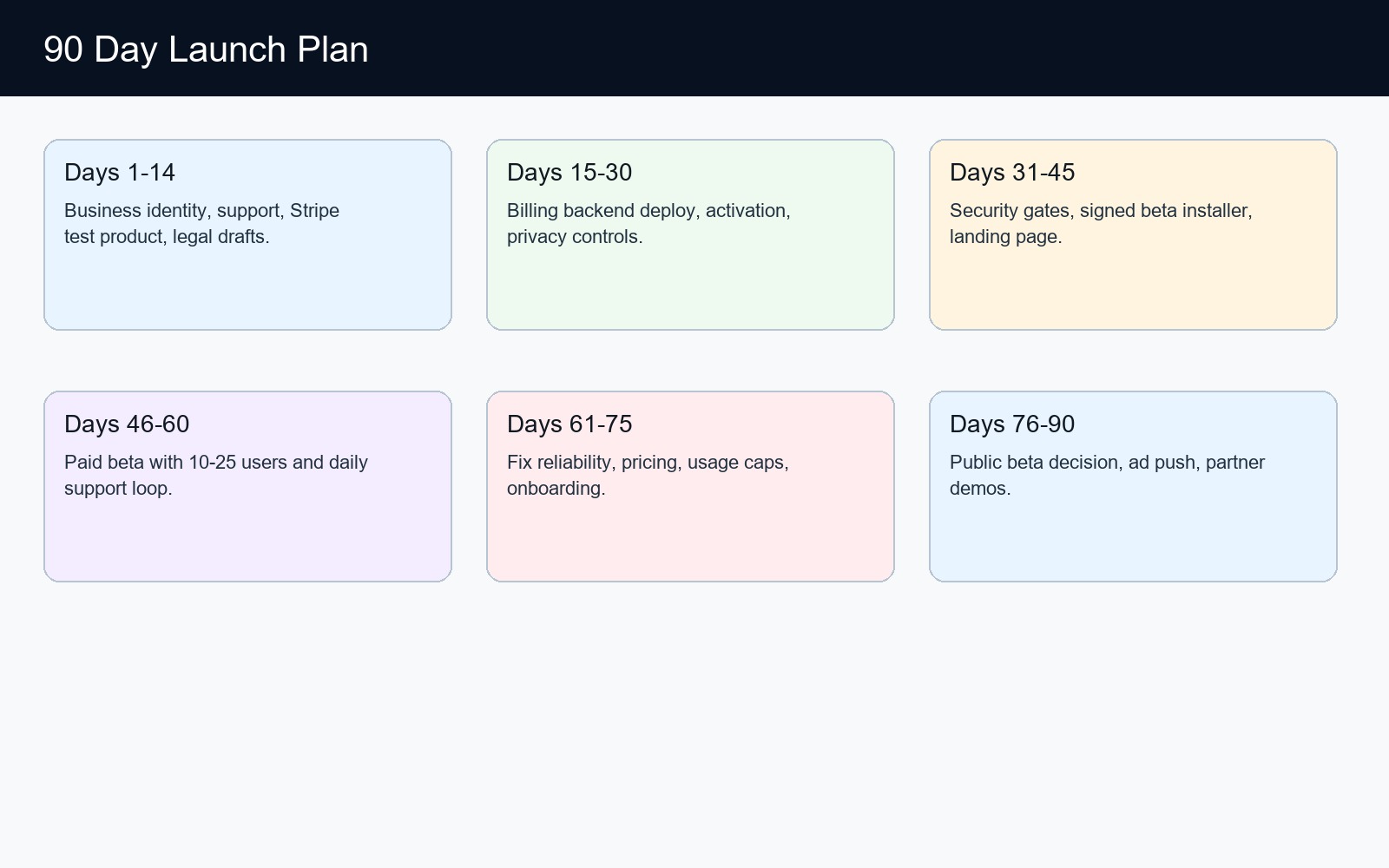
| 90-day launch roadmap | Diagram | Ready | Currentness not versioned | n/a | n/a | docs/launch_command_center/visuals/05_90_day_plan.jpg | Ready for command center. |
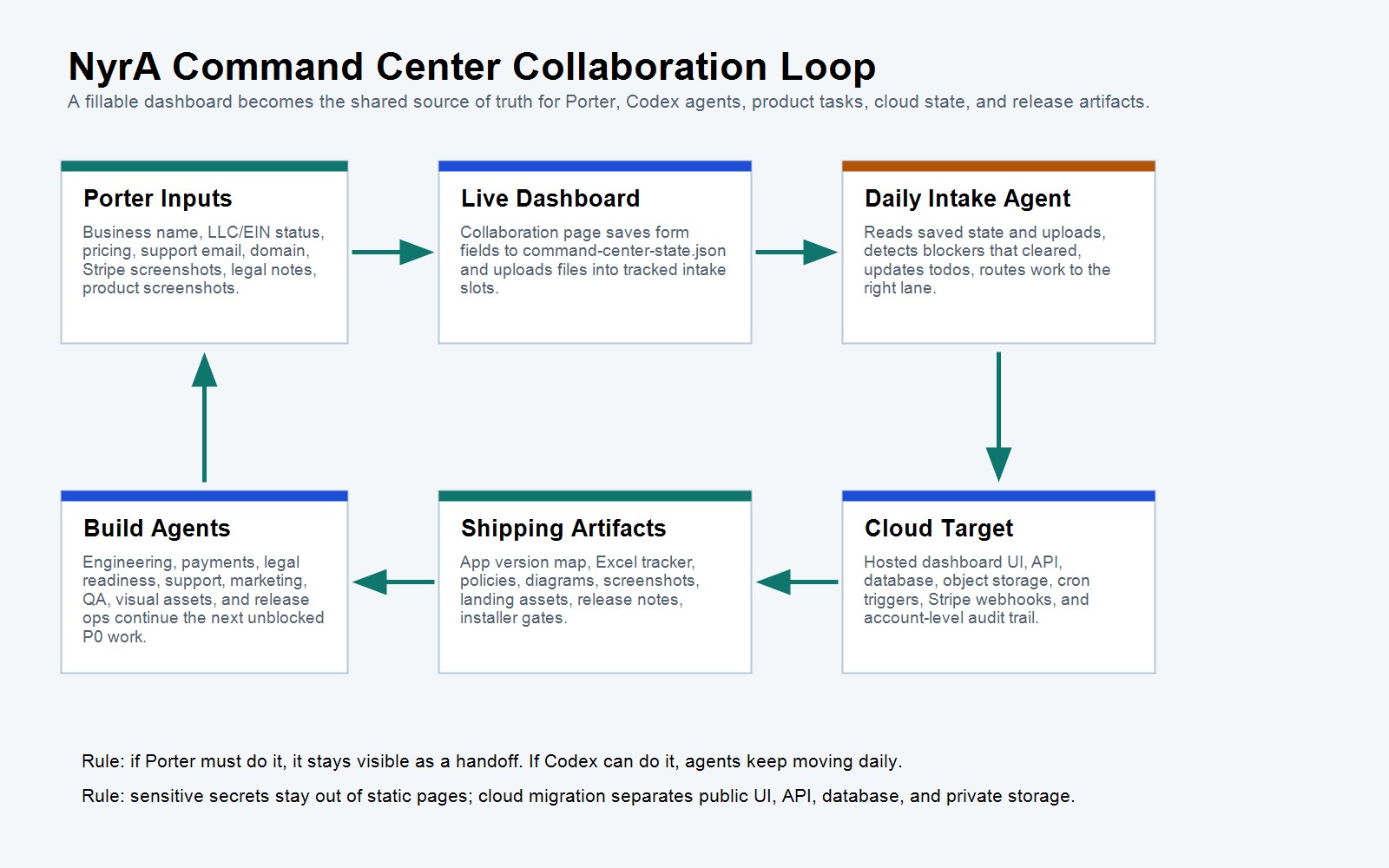
| Command center collaboration loop | Diagram | Ready | Currentness not versioned | n/a | n/a | docs/launch_command_center/visuals/06_command_center_collaboration_map.jpg | Ready for command center. |
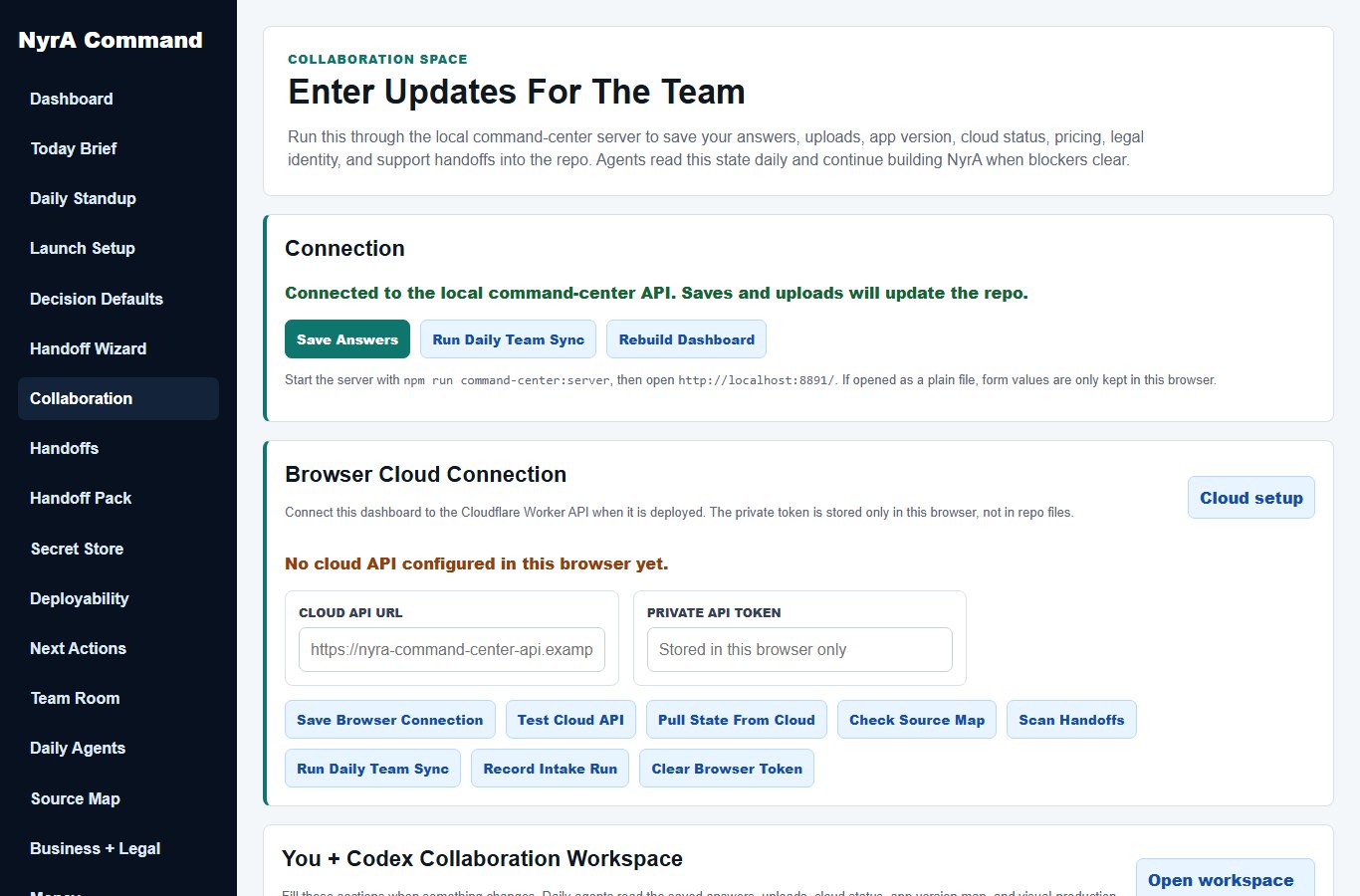
| Command center Collaboration page | Screenshot | Refresh required | Currentness not versioned | n/a | n/a | docs/launch_command_center/visuals/07_command_center_collaboration_page.jpg | Refresh after dashboard layout changes. |
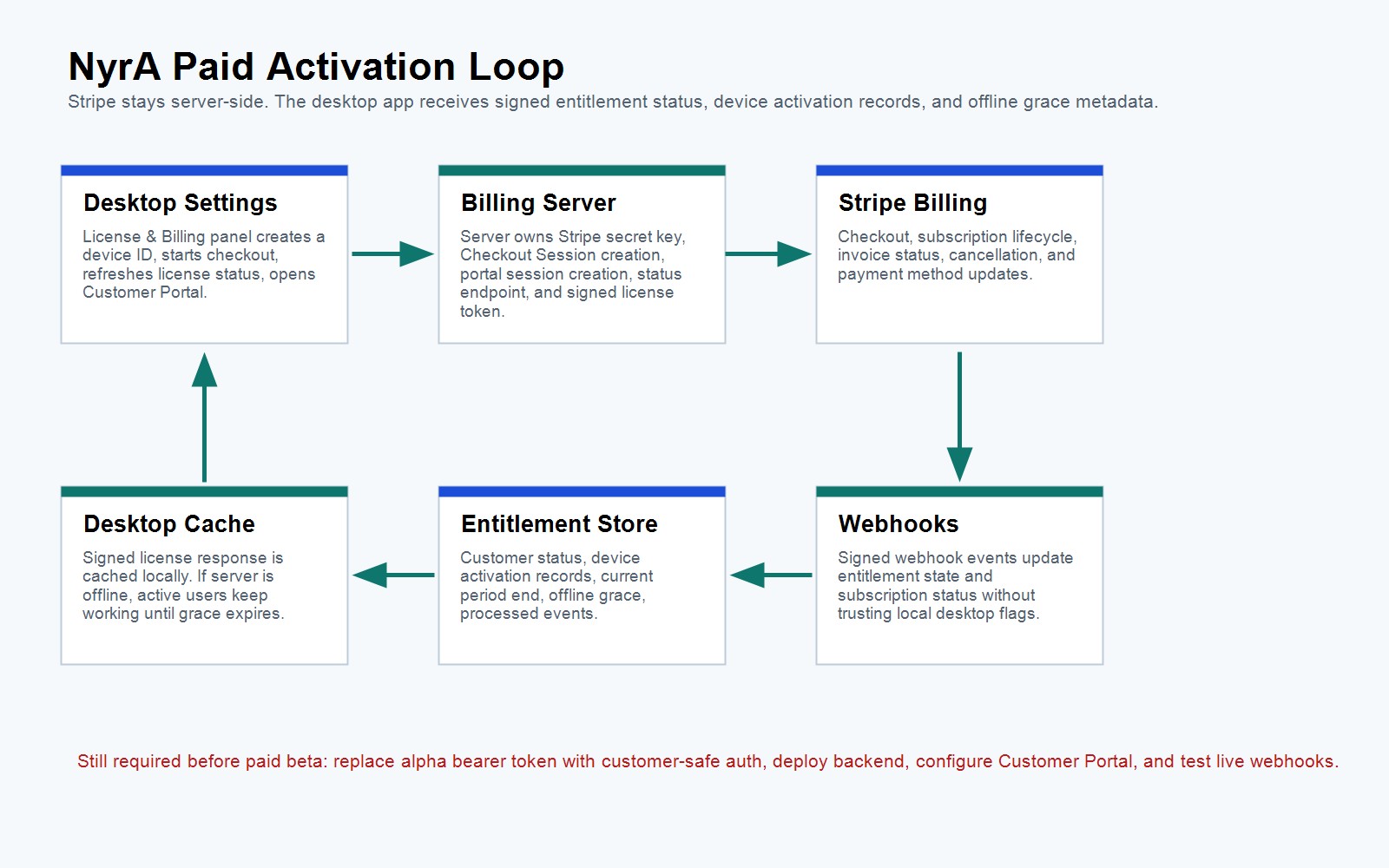
| License activation flow | Diagram | Partial | Currentness not versioned | n/a | n/a | docs/launch_command_center/visuals/08_license_activation_flow.jpg | Ready as a diagram; app screenshot still required before paid beta. |
| 90-second product demo | Video | Planned | Currentness not versioned | n/a | n/a | docs/launch_command_center/marketing/video-shotlist.csv | Shot list exists; record after final UI, billing, consent, support, policy URLs, and command-center flows match shipping build. |
| 30-second founding beta ad | Video | Planned | Currentness not versioned | n/a | n/a | docs/launch_command_center/marketing/video-shotlist.csv | Shot list exists; record after final screenshots, pricing, hosted AI cap, domain, and checkout URL are approved. |
Visual Production Pack
Open visual pack CSVThis is the daily queue for screenshot refreshes, Customer Portal capture, demo/ad video, launch-site visuals, and final paid-beta visual approval.
| Phase | Priority | Owner | Status | Freshness | Evidence Version | Current Version | Action | What To Do | Upload Slot | Verify |
|---|---|---|---|---|---|---|---|---|---|---|
| 1. Refresh Shipping Screenshot | P1 | Codex | Refresh required | Current | 0.1.0-alpha.83 | 0.1.0-alpha.83 | Desktop Alpha83 answer-first response | Refresh this screenshot from the current shipping build after UI, consent, billing, support, and release messaging are frozen. | product-screenshots | npm run visuals:inventory && npm run test:visual-assets |
| 1. Refresh Shipping Screenshot | P1 | Codex | Refresh required | Currentness not versioned | n/a | n/a | Idle NyrA buddy | Refresh this screenshot from the current shipping build after UI, consent, billing, support, and release messaging are frozen. | product-screenshots | npm run visuals:inventory && npm run test:visual-assets |
| 1. Refresh Shipping Screenshot | P1 | Codex | Refresh required | Currentness not versioned | n/a | n/a | Right-click command menu | Refresh this screenshot from the current shipping build after UI, consent, billing, support, and release messaging are frozen. | product-screenshots | npm run visuals:inventory && npm run test:visual-assets |
| 1. Refresh Shipping Screenshot | P1 | Codex | Refresh required | Currentness not versioned | n/a | n/a | Live voice controls | Refresh this screenshot from the current shipping build after UI, consent, billing, support, and release messaging are frozen. | product-screenshots | npm run visuals:inventory && npm run test:visual-assets |
| 1. Refresh Shipping Screenshot | P1 | Codex | Refresh required | Currentness not versioned | n/a | n/a | Wake-gated pause/listening behavior | Refresh this screenshot from the current shipping build after UI, consent, billing, support, and release messaging are frozen. | product-screenshots | npm run visuals:inventory && npm run test:visual-assets |
| 1. Refresh Shipping Screenshot | P1 | Codex | Refresh required | Currentness not versioned | 0.1.0-alpha.66 | n/a | Single buddy with right-click chat panel | Refresh this screenshot from the current shipping build after UI, consent, billing, support, and release messaging are frozen. | product-screenshots | npm run visuals:inventory && npm run test:visual-assets |
| 1. Refresh Shipping Screenshot | P1 | Codex | Refresh required | Currentness not versioned | n/a | n/a | Screen-look permission state | Refresh this screenshot from the current shipping build after UI, consent, billing, support, and release messaging are frozen. | product-screenshots | npm run visuals:inventory && npm run test:visual-assets |
| 1. Refresh Shipping Screenshot | P1 | Codex | Refresh required | Currentness not versioned | n/a | n/a | Camera permission state | Refresh this screenshot from the current shipping build after UI, consent, billing, support, and release messaging are frozen. | product-screenshots | npm run visuals:inventory && npm run test:visual-assets |
| 1. Refresh Shipping Screenshot | P1 | Codex | Refresh required | Currentness not versioned | n/a | n/a | Computer-control active state | Refresh this screenshot from the current shipping build after UI, consent, billing, support, and release messaging are frozen. | product-screenshots | npm run visuals:inventory && npm run test:visual-assets |
| 1. Refresh Shipping Screenshot | P1 | Codex | Refresh required | Currentness not versioned | n/a | n/a | Stop button / interruption evidence | Refresh this screenshot from the current shipping build after UI, consent, billing, support, and release messaging are frozen. | product-screenshots | npm run visuals:inventory && npm run test:visual-assets |
| 1. Refresh Shipping Screenshot | P1 | Codex | Refresh required | Stale | 0.1.0-alpha.80 | 0.1.0-alpha.83 | Android floating buddy over launcher | Refresh this screenshot from the current shipping build after UI, consent, billing, support, and release messaging are frozen. Current evidence is 0.1.0-alpha.80; shipping app is 0.1.0-alpha.83. | product-screenshots | npm run visuals:inventory && npm run test:visual-assets |
| 1. Refresh Shipping Screenshot | P1 | Codex | Refresh required | Stale | 0.1.0-alpha.80 | 0.1.0-alpha.83 | Android foreground panel and answer-first swarm state | Refresh this screenshot from the current shipping build after UI, consent, billing, support, and release messaging are frozen. Current evidence is 0.1.0-alpha.80; shipping app is 0.1.0-alpha.83. | product-screenshots | npm run visuals:inventory && npm run test:visual-assets |
| 5. Other Visual Evidence | P0 | Codex | Blocked | Missing | 0.1.0-alpha.83 | 0.1.0-alpha.83 | Android alpha83 responsive Command surface | Refresh after each mobile Command surface or autonomous-run layout change. | product-screenshots | npm run visuals:inventory && npm run test:visual-assets |
| 1. Refresh Shipping Screenshot | P1 | Codex | Refresh required | Stale | 0.1.0-alpha.80 | 0.1.0-alpha.83 | Android alpha83 Hide Bot recovery surface | Refresh this screenshot from the current shipping build after UI, consent, billing, support, and release messaging are frozen. Current evidence is 0.1.0-alpha.80; shipping app is 0.1.0-alpha.83. | product-screenshots | npm run visuals:inventory && npm run test:visual-assets |
| 2. Replace Diagram With App Screen | P1 | User + Codex | Partial | Currentness not versioned | n/a | n/a | Billing activation screen | Replace the diagram-only evidence with a current app screenshot after the relevant billing/support flow exists. | product-screenshots | npm run visuals:inventory && npm run test:visual-assets |
| 3. Billing Portal Capture | P0 | User + Codex | Blocked | Currentness not versioned | n/a | n/a | Customer Portal screen | After Stripe Customer Portal is configured, capture the real customer portal screen and attach sanitized evidence to the dashboard. | stripe-screenshots | npm run billing:live-preflight -- --mode test --allow-blocked && npm run visuals:pack |
| 1. Refresh Shipping Screenshot | P1 | Codex | Refresh required | Currentness not versioned | n/a | n/a | Command center Collaboration page | Refresh this screenshot from the current shipping build after UI, consent, billing, support, and release messaging are frozen. | product-screenshots | npm run visuals:inventory && npm run test:visual-assets |
| 2. Replace Diagram With App Screen | P1 | User + Codex | Partial | Currentness not versioned | n/a | n/a | License activation flow | Replace the diagram-only evidence with a current app screenshot after the relevant billing/support flow exists. | marketing-assets | npm run visuals:inventory && npm run visuals:pack |
| 4. Demo And Ad Video | P1 | Codex | Planned | Currentness not versioned | n/a | n/a | 90-second product demo | Record this video only after final UI, pricing, hosted AI cap, support path, policy URLs, checkout URL, and screenshots match the shipping build. | marketing-assets | npm run marketing:kit && npm run visuals:pack |
| 4. Demo And Ad Video | P1 | Codex | Planned | Currentness not versioned | n/a | n/a | 30-second founding beta ad | Record this video only after final UI, pricing, hosted AI cap, support path, policy URLs, checkout URL, and screenshots match the shipping build. | marketing-assets | npm run marketing:kit && npm run visuals:pack |
Safe Visual Command Sequence
| Phase | Owner | Command | Purpose | No-Go Rule |
|---|---|---|---|---|
| 0. Inventory Refresh | Codex | npm run visuals:inventory && npm run test:visual-assets |
Refresh screenshot, diagram, and video evidence rows and verify Visuals dashboard wiring. | Do not approve paid-beta screenshots from stale inventory. |
| 1. Refresh Shipping Screenshot | Codex | npm run test:product-smoke:worktree |
Snapshot the current source without secrets or runtime state, run a fresh install/build outside synced folders, and regenerate the core workspace plus computer-control screenshots. | Do not use cloud-synced node_modules or a stale committed HEAD as current release evidence; require a passing current-worktree snapshot smoke for the shipping version. |
| 1. Refresh Shipping Screenshot | Codex | npm run test:computer-use:realtime && npm run test:computer-use:screen && npm run test:computer-use:interrupt && npm run test:computer-use:camera |
Refresh API-backed live voice, screen awareness, stop/interruption, and camera screenshots after provider keys, consent settings, and UI copy are final. | Run only after the current UI is stable, provider credentials are available outside the repo, and the public offer matches the dashboard. |
| 2. Launch Site Visuals | Codex | npm run launch-site:build && npm run test:launch-site |
Rebuild the launch site so public screenshots and safe claims stay aligned with current assets. | Checkout and public claims stay blocked until live payment, support, legal, and release gates close. |
| 4. Demo And Ad Video | Codex | npm run marketing:kit && npm run test:marketing-kit |
Refresh demo shot list, ad scenes, captions, email/social copy, and campaign calendar from the latest visual state. | Do not publish final campaign assets until screenshots, domain, price, support, policy URLs, and checkout URL are final. |
| 5. Release Approval | User + Codex | npm run visuals:pack && npm run release:candidate:preflight |
After fresh evidence is captured, set finalScreenshotsApproved=Yes and verify the release candidate visual gate. | Paid beta remains blocked if visual inventory is not VISUALS_READY_FOR_RELEASE or final approval is not Yes. |
Visual Asset Production Plan
Goal: turn the full launch path into diagrams, instructions, pictures, and videos.
Diagrams To Produce
- Business formation map.
- Stripe subscription architecture.
- Privacy/consent data flow.
- Desktop activation flow.
- 90-day launch roadmap.
- Customer support workflow.
- Marketing funnel.
- Paid beta onboarding flow.
- Command center collaboration loop.
- Live command center page screenshots.
- License activation and billing entitlement flow.
Instruction Sets To Produce
- How to form the business.
- How to set up Stripe.
- How to configure Customer Portal.
- How to create support inbox.
- How to buy domain and connect docs.
- How to run billing backend locally.
- How to test checkout in Stripe test mode.
- How to run release gates.
Pictures/Screenshots Needed
- Idle NyrA buddy.
- Right-click menu.
- Live voice controls.
- Screen-look permission state.
- Camera permission state.
- Computer-control active state.
- Stop button/emergency stop.
- Billing activation screen after built.
- Customer Portal screen after configured.
- Command center Collaboration page after live server save/upload works.
Video Pack
- 90-second product demo.
- 30-second founding beta ad.
- 15-second screen-aware helper clip.
- 15-second voice-first workflow clip.
- 60-second trust/safety explanation.
- 2-minute installation/onboarding walkthrough.
Automation Agents
- Launch Research Agent: refreshes legal/tax/payment/source changes weekly.
- Visual Asset Agent: converts docs into diagrams, screenshots, and storyboard prompts.
- Marketing Campaign Agent: creates copy, posts, email, landing page sections, and ad variants.
- Payment Center Agent: advances Stripe/backend/license/customer portal tasks.
- Release Trust Agent: advances signing, installer, versioning, and release notes.